
It's Sunday evening. The lesson plans aren't done, essays are stacked on the kitchen table, and report card comments are due Friday.
Here's something teacher training doesn't cover: the teaching is the easy part. The paperwork is what eats your life. Planning, grading, comments, parent emails, and all of it happens after the kids go home.
AI can't teach your class. It can't look a struggling kid in the eye and know what they need.
But it's surprisingly good at paperwork. The blank-page stuff. The "write 30 versions of the same comment" stuff.
That's what this list is for: 25 copy-paste prompts covering the 5 jobs that take up most of a teacher's time. Each one works in ChatGPT, Claude, or Gemini, free plans included. Replace the [BRACKETS], paste it in, and edit the result like the professional you are.
Let's get your Sundays back.
How to Get Good Results (Read This First)
Five habits separate teachers who love AI from teachers who tried it once and quit:
- Be specific. "Write a lesson plan" gives you mush. "A 45-minute lesson plan for 7th grade on fractions" gives you something usable. Fill in the [BRACKETS].
- Treat the first answer as a draft. Too long? Say "shorter." Tone off? Say "warmer." AI never gets tired of revisions, so use that.
- Never paste student names or personal details. Not anywhere, ever. Write "Student A" instead. This one is non-negotiable (more in the FAQ).
- Always read before you use. You're the teacher and AI is the assistant. Check facts and tone. Thirty seconds of review can save you an awkward moment later.
- Save what works. When a prompt gives you gold, save it with your tweaks. In a month you'll have your own personal prompt library.
Wondering which AI tool to use? See our free-plan comparison: ChatGPT vs Claude free plan. New to AI entirely? Start here: 15 easy AI tools for beginners.
1. Lesson Planning
This is where most teachers lose their Sundays. These five prompts handle the blank page. You bring the expertise; AI brings the first draft.
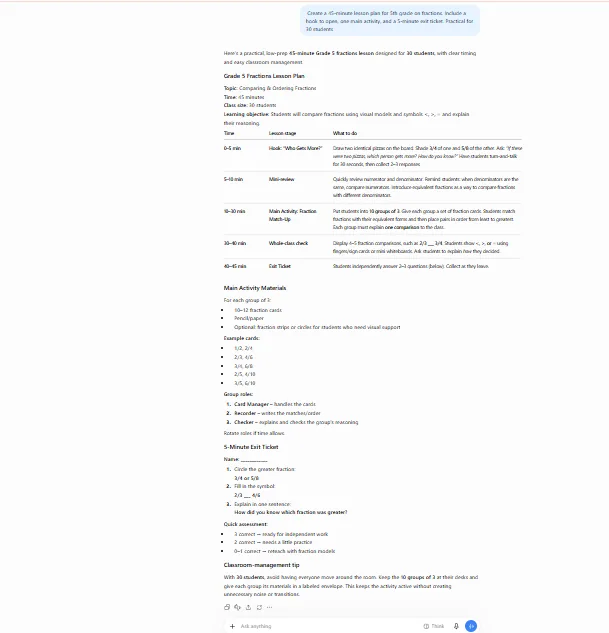
Prompt 1: The 45-Minute Lesson Plan
Why it works: You get a clear structure (hook, activity, check) instead of a wall of text.
Prompt 2: Differentiate Without Extra Hours
Best for: The slowest part of planning. Differentiation is where AI saves the most time.
Prompt 3: The Whole Week, Mapped Out
Why it works: Seeing the whole week at once breaks the overplan-on-Monday, panic-on-Wednesday cycle.
Prompt 4: Hooks That Actually Hook
Teacher tip: The first five minutes decide the next forty. Ask for five options and keep the best one.
Prompt 5: The Emergency Sub Plan
Do it now: Write this while you're healthy, not at 6am when you're sick.
2. Grading & Feedback
The job that follows you home. You can't skip it, but the repetitive commenting part can absolutely go faster.
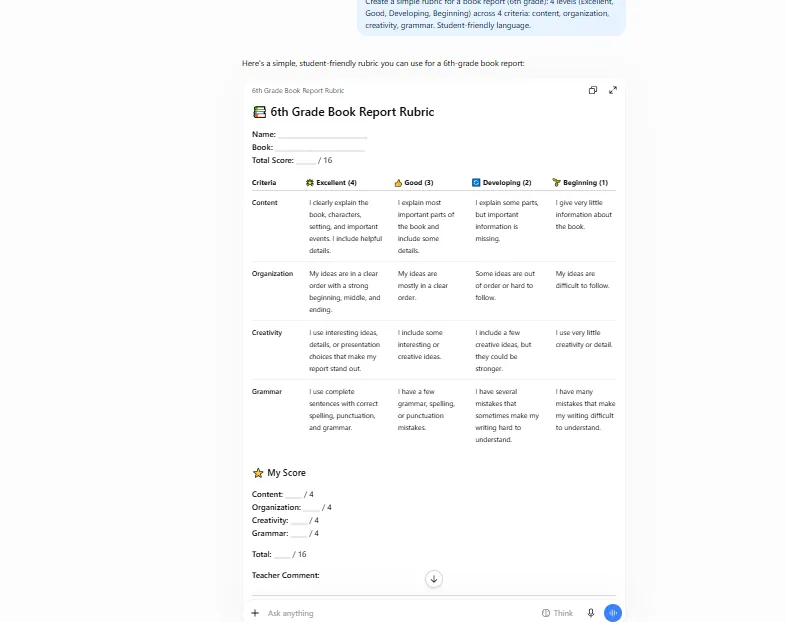
Prompt 6: Rubric in 60 Seconds
Why it works: Rubrics follow a formula, which makes them perfect AI territory. And grading goes much faster with one in hand.
Prompt 7: Feedback That Sounds Like You on a Good Day
Best for: That 11pm "what do I even write here" moment.
Prompt 8: Batch-Grade Short Answers
The payoff: A pile of short answers gets sorted in a fraction of the time. Spot-check a few before you record any grades.
Prompt 9: Build Your Comment Bank
Why it works: Do it once and you'll never stare at a blank comment box again.
Prompt 10: Fix My Vague Feedback
Best for: Turning "Good job!" into feedback that actually helps.
3. Report Card Comments
Thirty kids, thirty unique comments, all due Friday. It's the most dreaded writing in teaching, and also the easiest to speed up.
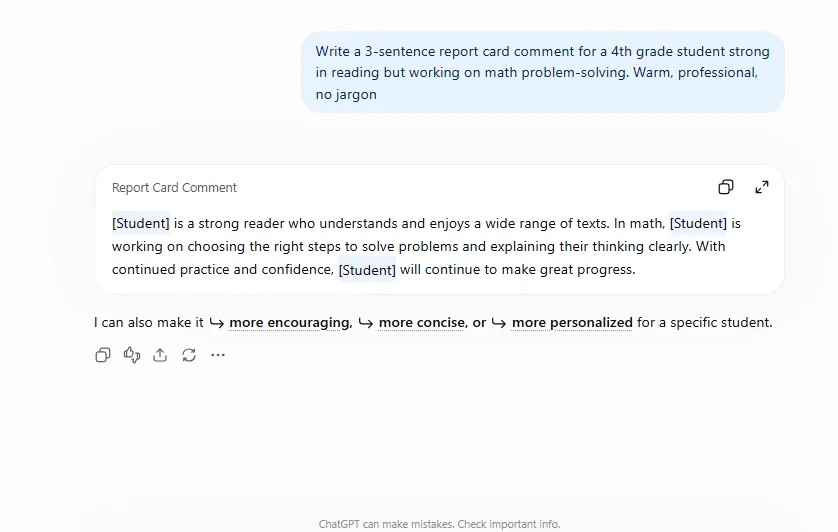
Prompt 11: The Strength-Based Comment
Why it works: Good comments lead with strengths anyway. AI just puts them together faster.
Prompt 12: The Honest-but-Kind One
Best for: The hardest comments to write. The "one thing parents can do" line is what makes them useful.
Prompt 13: Academics + Behavior in One
Why it works: AI blends the two halves into one smooth paragraph in seconds.
Prompt 14: Never Sound Copy-Pasted
Good to know: Parents talk to each other, and they notice identical comments.
Prompt 15: Comments Every Parent Can Read
Why it works: Jargon fails the families who need clear comments the most.
4. Quizzes & Classroom Activities
Good activities take planning. Great ones take planning plus a burst of 10pm inspiration. Let AI supply the inspiration.
Prompt 16: Quiz in a Flash
Why it works: It's a classic for a reason: it saves real time on every single unit. Always check the answer key before it reaches students.
Prompt 17: Discussion Questions That Don't Die in Silence
Why it works: The easy-to-hard ladder gives every student a way in.
Prompt 18: Exit Tickets for the Week
The payoff: A full week of quick check-ins from one prompt.
Prompt 19: Group Activity, Fully Planned
Why it works: Group work usually fails on logistics. Clear roles and a launch script fix that.
Prompt 20: Vocabulary That Sticks
Why it works: Definitions plus immediate use is the combination that actually builds vocabulary.
5. Parent Communication & Admin
The emails, the newsletters, the agendas. Nobody became a teacher for this part, so let's shrink it.
Prompt 21: The Difficult Email, Made Easier
Why it works: Difficult emails get put off for days. A quick first draft takes away the dread.
Prompt 22: The Fridge-Worthy Note
Teacher tip: Thirty seconds with AI can buy months of goodwill. Send more of these than you think you should.
Prompt 23: Newsletter in Minutes
Why it works: You already know what happened this month. AI just turns your bullets into readable paragraphs.
Prompt 24: Meeting Agenda
Good to know: An agenda changes the tone of the meeting, and asking parents questions often brings out the real story.
Prompt 25: The Admin Request
Why it works: Specific requests get approved. Vague ones get ignored.
Frequently Asked Questions
Do these work on the free plans of ChatGPT, Claude, and Gemini?
Yes. Every prompt here is plain text, so no paid features are needed. Choosing between tools? See our free-plan comparison: ChatGPT vs Claude free plan.
Is it safe to paste student work into AI tools?
Paste the work, never the identity. Remove names and photos; "Student A" is fine. And check your school's AI policy first, because those rules come first.
Will AI replace teachers?
No, and this list shows why. Every prompt produces a draft that needs your judgment. You check the facts, fix the tone, and decide what fits your kids. AI handles paperwork; teaching stays human.
What if the AI gets facts wrong?
It happens, especially with dates and names. Treat the output like a student draft: useful, but verify it before it reaches your class. Always double-check answer keys.
Which AI tool is best for teachers?
All of them handle these prompts well. What differs is the free-plan limits, compared here: ChatGPT vs Claude free plan. Brand new to AI? Start here: 15 easy AI tools for beginners.
Can I adapt these for any grade or subject?
That's what the [BRACKETS] are for. Kindergarten phonics or high-school chemistry: same prompt shape, different brackets.
Related reading: 15 Easy AI Tools for Beginners in 2026 and ChatGPT vs Claude Free Plan: Which Is Better for Beginners in 2026?