
Most teachers don't need another app. They need their Sunday evenings back.
Picture it: it's 9:40 on a Sunday night. The week's lessons aren't planned, there's a stack of essays on the kitchen table, and a parent emailed Friday about a missing assignment you haven't answered. The teaching itself — the part in front of the kids — is the good part. It's everything around it that eats the hours.
The hours don't go where you'd expect. They go to the second shift: writing lesson plans at 9pm, grading, answering the same parent email for the fifth time, rewriting one worksheet three ways for three reading levels.
This guide isn't about "AI in education" as some big idea. It's ten specific jobs, each with the exact prompt to use and a tip for how it actually plays out in a real classroom. Pick one tonight and try it tomorrow morning. That's the whole method.
One honest note: I’m not a classroom teacher. This guide is built from testing the prompts and timing the results, so treat the classroom tips as starting points to adapt to your room — not a teacher’s field notes.
Before You Start: 3 Rules
Three rules, and they're non-negotiable:
1. Never put student names, grades, or personal details into an AI chat. "A 4th grader who struggles with fractions" is fine. A named child with their report card is not. If you wouldn't post it on the classroom wall, don't paste it into a chatbot.
2. Check every output before it reaches a student or parent. AI invents facts with total confidence — a wrong date in a history worksheet, a made-up quote, a math error in an answer key. You sign everything it drafts.
3. Follow your school's AI policy. Some schools have approved tools and rules about what's allowed. If yours does, use those. When in doubt, ask — it takes two minutes and saves real trouble.
10 Ways AI Saves Teachers Hours Every Week
1. Draft a lesson plan in minutes
The blank page is the hardest part of planning. Give AI your topic, grade, time slot, and the parts you want — it hands back a structure you can edit instead of a void you have to fill.
Teacher tip: Always add your classroom's reality — "my students already covered evaporation" or "I have no lab equipment." The plan gets dramatically better when it knows your constraints. And once a structure works, reuse it: "same format, new topic: the solar system" gives you next week's plan in seconds.
2. Teach one topic at three levels
You have 25 kids at different levels and one of you. Asking AI to explain the same concept three ways — struggling, on-level, advanced — turns a 40-minute rewrite into a two-minute job.
Teacher tip: Read the below-level version out loud. If it sounds patronizing, ask for "simpler words, same respect." Tone matters as much as vocabulary. This is also a quick way to draft differentiated versions of your materials (for IEP students, follow the plan and your special-ed team) — same content, adjusted reading level, in seconds.
3. Make quizzes and exit tickets on demand
Need five questions on yesterday's lesson by first period? Describe the topic and the question types. Done before your coffee cools.
Teacher tip: Ask for the answer key in the same prompt. Grading a quiz you didn't have to make and didn't have to solve is the real time-saver.
4. Build a rubric that matches your assignment
Rubrics take forever because every criterion has to be worded just right. Give AI the assignment and the point breakdown — it drafts the language, you adjust the judgment calls.
Teacher tip: The first draft is never quite your standard. Edit one row to match how you grade, then tell it "match this tone for the rest." Two minutes, and it's yours. Bonus: a clear rubric handed out with the assignment cuts "why did I get this grade?" conversations in half.
5. Write grading feedback faster
The comments take longer than the grading. "Good effort" thirty times isn't feedback. Feed AI the rubric and a few notes per paper — it turns "weak thesis, good examples" into three sentences that actually help.
Teacher tip: Never paste student names — use "Student A" or just the notes. And always read it before it goes on the paper. You're signing it.
6. Write parent emails without the dread
The hard emails — behavior concerns, missing work, "we need to talk" — take twenty minutes each because every word feels loaded. AI drafts the professional version; you add the human part.
Teacher tip: Add one specific, kind observation about their child before sending — "She asks great questions in class." AI can't know that. You can. It's what keeps the email from sounding like a form letter. And keep a copy: when the same issue comes up in a meeting, you'll be glad the paper trail exists.
7. Write report card comments that don't all sound the same
By comment fifteen, everything sounds like "a pleasure to have in class." Give AI three honest bullets per student and get back a real paragraph.
Teacher tip: Do these in batches of five, then take a break. Even with AI, twenty-five comments in one sitting turns your brain to mush. The tool is fast; you don't have to be.
8. Make reading passages at the right level
Finding a passage at exactly the right reading level on exactly your topic is a unicorn hunt. Just ask for one — topic, length, level, questions included.
Teacher tip: Check the level before printing — run it through a free readability tool such as the Flesch-Kincaid score in Microsoft Word. If it's off, ask for "simpler words" and check again. Two tries max, then move on.
9. Find analogies for the topic they never get
Every teacher has a topic students never get. Ask AI for five analogies, pick the best one, and watch it click.
Teacher tip: The weirder the analogy, the better it sticks — but test it on one student first. If they laugh and get it, it's a keeper.
10. Plan your week in one sitting
Friday afternoon, twenty minutes: dump the week into AI and get it mapped out — prep blocks, grading windows, meetings, buffer time.
Teacher tip: Tell it what to protect. "No grading after 7pm" or "keep my lunch break sacred" — the plan only respects boundaries you name.
My Test: Doing It Both Ways, Timed
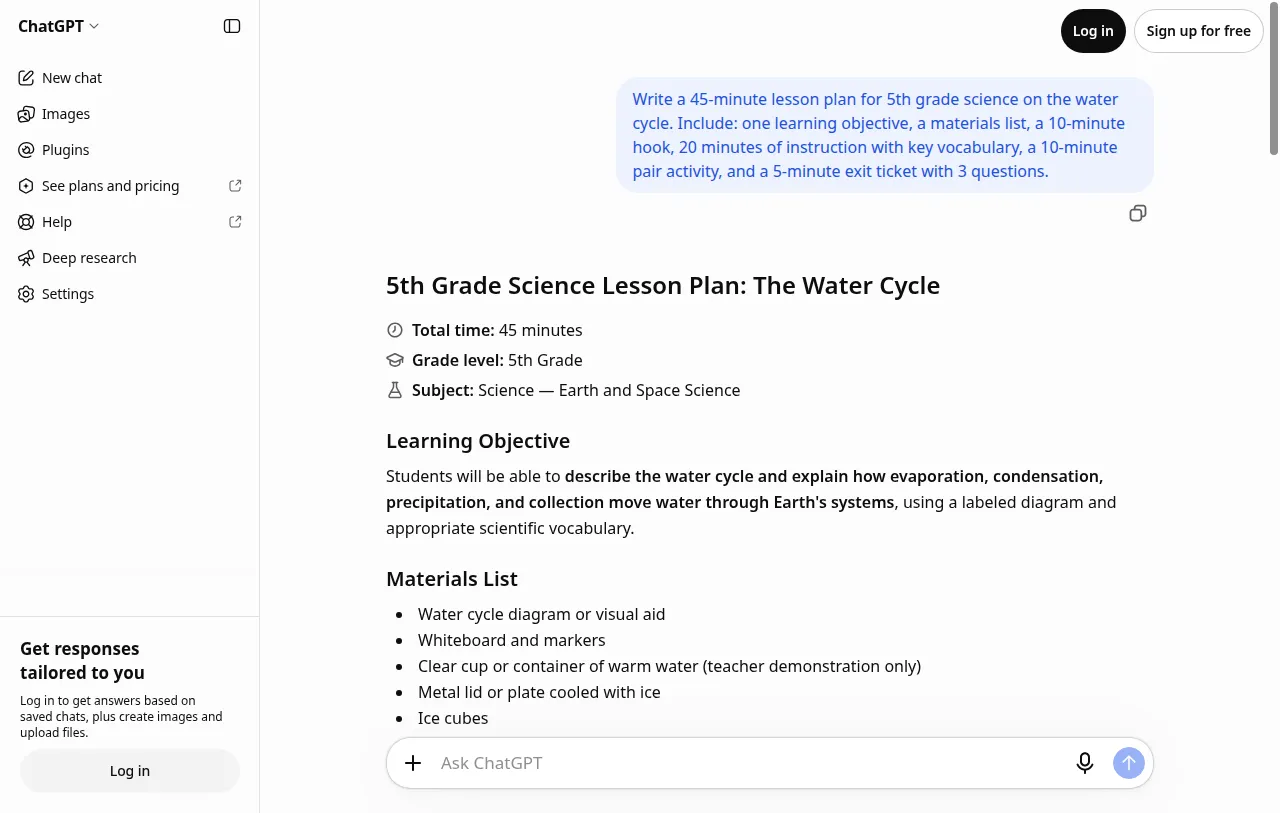
I wanted more than theory, so I ran the test myself: the same 45-minute water cycle lesson plan from Way 1, done two ways, timed.
With AI: I sent the exact prompt from Way 1 to ChatGPT's free plan. Under a minute later I had a complete lesson plan — objective, materials list with a safety note, timed hook, twenty minutes of instruction with all four vocabulary words defined and explained, pair activity, exit ticket with an answer key, even differentiation notes I hadn't asked for. Around 900 words: more than I'd print, but the entire structure was there.
It wasn't perfect. The plan ends with a filler question ("Would you like me to create a printable worksheet?") instead of just stopping. Light editing, not a rewrite — about ten minutes with a red pen. What surprised me: it included things I wouldn't have thought to add at 9pm — the safety note for the warm-water demo, a misconception correction (clouds aren't water vapor alone), sentence starters for struggling students ("Water evaporates when…"), a mastery bar (2 of 3 exit questions right). The extras are where the value hides.
Below is an edited excerpt of ChatGPT's actual output, from the same chat as the screenshot below:
Click to see an excerpt of the ChatGPT output
Edited for length — the full output ran about 900 words. The parts below are quoted word for word.
5th Grade Science Lesson Plan: The Water Cycle
Total time: 45 minutes
Grade level: 5th Grade
Learning Objective
Students will be able to describe the water cycle and explain how evaporation, condensation, precipitation, and collection move water through Earth's systems, using a labeled diagram and appropriate scientific vocabulary.
1. Hook: Where Does Rain Come From?
Show a picture of rain clouds or ask students to observe a puddle after a rainy day.
Ask: “Where does the water in clouds come from?” and “Why do puddles disappear on sunny days?”
1. Evaporation
Liquid water gains energy and changes into water vapor, a gas. Example: a puddle drying in the Sun.
4. Exit Ticket: Check for Understanding
Question 1: What is evaporation, and what provides most of the energy that drives it?
Question 2: What happens during condensation, and how does it help clouds form?
Question 3: A cloud releases rain onto a mountain, and the water flows into a river. Identify the stage represented by the rain and explain what happens to the water afterward.
Assessment and Answer Key
| Question | Expected answer |
|---|---|
| 1 | Evaporation is the change from liquid water to water vapor; energy from the Sun drives much of it. |
| 2 | Condensation occurs when water vapor cools and forms tiny liquid droplets or ice crystals that make up clouds. |
| 3 | The rain is precipitation. The water may flow as runoff into the river, where it collects and continues through the water cycle. |
For students needing support: Provide a partially labeled diagram, a word bank, and sentence starters such as “Water evaporates when…”
Would you like me to create a printable student worksheet or a water cycle diagram with labels and arrows to accompany this lesson?
Without AI: I wrote the same plan myself from scratch: about forty minutes. Thinking through the objective, sequencing the 45 minutes, writing the exit ticket questions, double-checking the vocabulary definitions. A teacher doing this at 9pm on a Sunday, after a full day of teaching? That's where your evening goes.
The verdict: One minute to generate and ten to edit — eleven total — against forty by hand. But the real gap isn't the minutes. It's the blank page. Starting from a full draft you can argue with beats starting from nothing, every single time.
The Best Free AI Tools for Teachers
You don't need to pay for any of this. Three free plans cover everything above:
- ChatGPT — a strong all-rounder for everyday drafts and plans.
- Claude — writes the most natural-sounding emails and feedback; best when tone matters.
- Gemini — solid for quick classroom materials, and handy if your school runs on Google Workspace.
I compared all three properly here: ChatGPT vs Claude (free plans), ChatGPT vs Gemini (free plans), and Claude vs Gemini (free plans).
What AI Can't Do for Teachers
Three things, and they matter more than the ten above:
It can't build relationships. No prompt creates the trust that makes a struggling kid try again. That's you, over months, showing up.
It can't read the room. AI can't see the confused face in row three or hear the wobble in a student's voice before they cry. You adjust in real time. It can't.
It can't guarantee facts. AI invents dates, quotes, and "facts" with total confidence. Every worksheet, every quiz, every passage — verify before it reaches students. This is the one rule that never bends: a wrong answer key teaches thirty kids the wrong thing at once.
Use AI for the paperwork. Keep the teaching.
Frequently asked questions
Will AI replace teachers?
No. It replaces paperwork, not teaching. The parts that matter — trust, judgment, knowing your students — aren't tasks you can put in a prompt.
Is using AI cheating?
Using AI to draft your lesson plan is like using a calculator for arithmetic — a tool doing the mechanical part. The teaching decisions are still yours. (For students it's different, which is exactly why your school has an academic honesty policy.)
Is the free plan enough?
For everything in this guide, yes. My timed test ran on ChatGPT’s free plan. Paid plans buy speed and higher limits, not better lesson plans. Start free; you'll know if you ever outgrow it.
Is student data safe?
Only if you keep it out of the chat. Never paste names, grades, IEP details, or anything identifiable into an AI tool. "A 4th grader" is fine; a named child is not. On ChatGPT’s personal plans, your chats may be used to train the model unless you opt out — see how OpenAI uses your data.
Conclusion
Start with one job — the one eating your evenings right now. Run the prompt, edit the output, notice how much of your Sunday you get back. Then add a second one.
When you want more, these go deeper: 25 AI Prompts for Teachers — 25 copy-paste prompts for lesson plans, grading, quizzes, and parent emails, each with the exact wording to use. And if you want to get better at the prompting itself: How to Write Better AI Prompts.