A few months ago, a teacher friend texted me, frustrated. “This AI thing is useless,” she wrote. “I asked it for a lesson plan and it gave me garbage.”
She sent me a screenshot of her prompt. It said, word for word:
Make a lesson plan for fractions.
That was the whole thing. No grade level. No time limit. No mention of what her students already knew. I rewrote it for her in about thirty seconds, she ran it again, and the difference was embarrassing — same tool, same account, same afternoon. The first answer belonged in the bin. The second one she used in class the next day.
Nothing about the AI changed. The ask changed.
I’ve written hundreds of prompts since — for emails, lesson plans, research, summaries, even birthday speeches. The pattern never changes: most bad AI answers are bad prompts wearing a disguise. And the fix is not talent. It’s a small, repeatable method anyone can learn in ten minutes.
This guide is that method.
Why most prompts fail (it’s always one of three things)
Before the method, the diagnosis. When an answer disappoints you, it’s almost always because the prompt was:
- Too vague. “Write about marketing” could mean a tweet or a thesis. The model guesses — and guesses wrong.
- Missing context. It doesn’t know your audience, your situation, or what “good” looks like to you. It can’t know. You never told it.
- Missing a format. You wanted bullet points; it wrote an essay. You wanted 100 words; it wrote 600. That’s not the model’s fault. You didn’t specify.
Notice what’s not on the list: the model being stupid, or you needing a paid plan. In my experience, a clear prompt on a free plan beats a lazy prompt on a paid plan nearly every time.
The 4-part method I use for every prompt
Every prompt I write now has four ingredients. I remember them as Goal, Context, Constraints, Format:
- Goal: What exactly do you want? One sentence, one job.
- Context: Who is this for? What’s the situation? What should the model know?
- Constraints: Length, tone, what to avoid, what to include.
- Format: Bullets? Email? Table? Numbered steps?
| Part | Ask yourself | Example |
|---|---|---|
| Goal | What exactly do I want? | “Write a follow-up email” |
| Context | Who is this for? What’s going on? | “5th-grade teacher; the parent is busy but supportive” |
| Constraints | Any limits? | “Under 150 words, warm tone, no jargon” |
| Format | What should it look like? | “Greeting, two short paragraphs, invite line” |
Watch how a prompt grows up. Here’s a real one, built in stages:
Stage 1 — the way most of us start:
Write an email to a parent.
You’ll get something generic, slightly stiff, and probably too long.
Stage 2 — add a goal and context:
Write an email to a parent telling them their child missed 3 homework assignments this month. Keep it warm, not alarming.
Better. Now it knows the situation and the tone.
Stage 3 — the full method:
Write an email to a parent telling them their child missed 3 homework assignments this month.

Context: I'm their 5th-grade teacher. The parent is supportive but busy.
Constraints: Under 150 words. Warm and professional — no blame, no jargon.
Format: Short greeting, two short paragraphs, then one line inviting them to discuss a plan. Sign off as "[Your Name], 5th-grade teacher".
That prompt is longer to write — maybe forty seconds instead of five. But the answer comes back nearly usable as-is, which saves you ten minutes of editing. That’s the trade that matters.
You don’t need all four parts every time. A quick question (“What’s 15% of 240?”) needs none of this. But anything you actually care about — writing, planning, explaining — deserves the full thirty seconds.
Before and after: two real examples
Theory is nice. Here are two prompts I actually ran, the weak version and the fixed version, and what changed.
Example 1: The cover letter
Weak prompt:
Write a cover letter for a job.
What came back: the most generic letter imaginable — “I am writing to express my interest in the position at your esteemed company.” No role, no skills, no reason to keep reading. A hiring manager would bin it in ten seconds.
Fixed prompt:
Write a cover letter for a junior graphic designer role at a small marketing agency. I have 2 years of freelance experience, mostly social media graphics for local businesses. Under 250 words. Confident but not arrogant — no "esteemed company" clichés. Mention one specific strength: turning rough client ideas into clean visuals fast. End with a direct ask for a 15-minute intro call.
What came back: just over 200 words, specific from the first line. It named the freelance background, led with the strength, and closed by asking for the call instead of the usual “I look forward to hearing from you.”
What changed: the exact role, real background, a length, banned clichés, one concrete strength, and a real ending. Six specifics — and suddenly it sounds like a person, not a template.
Example 2: The brainstorm that goes nowhere
Weak prompt:
Give me business ideas.
What came back: a list of twenty generic ideas — “start a blog,” “open a bakery” — the same list it gives everyone. My cousin, who actually asked me this one, said it felt like a fortune cookie.
Fixed prompt:
I have $500, 10 free hours a week, and I'm good at fixing bicycles. Suggest 3 small business ideas I could start this month in a mid-size city. For each: what I'd sell, who'd buy it, and the first concrete step. Be honest about which one is riskiest.
What came back: three specific ideas (mobile bike repair, refurbished kids’ bikes, a weekend repair workshop), each with a buyer and a first step — plus an honest note that the workshop was the riskiest because it needed a venue. He started the mobile repair one.
What changed: constraints turned a generic list into a personal plan. “Be honest about the risk” is my favorite constraint — it tends to cut through the model’s habit of telling you everything is a great idea.
My own tests: 3 prompt pairs, with screenshots
You don’t have to take my word for any of this. I ran these three pairs myself on ChatGPT’s free plan — same tool, minutes apart. Weak prompt first, fixed prompt second.
Pair 1: Healthy eating intro
Weak prompt:
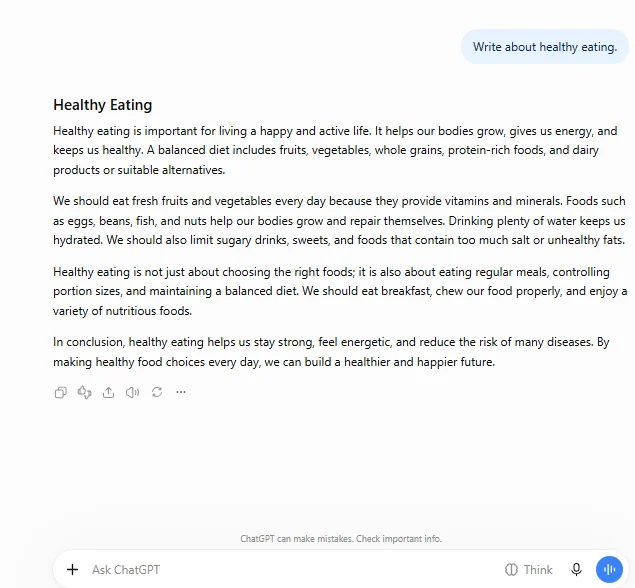
Write about healthy eating.
What came back was a generic school-essay-style article — “Healthy eating is important for living a happy and active life…” — the kind of thing that could have been written in 2010, for nobody in particular.
Fixed prompt:
Write a 150-word introduction about healthy eating for busy parents. Friendly tone, no medical jargon. End with one simple tip they can try tonight.
What came back spoke to parents’ actual lives — work, school runs, household chores — and ended with: “Tonight’s simple tip: Add one extra vegetable to your family’s dinner.” Same topic, completely different usefulness.
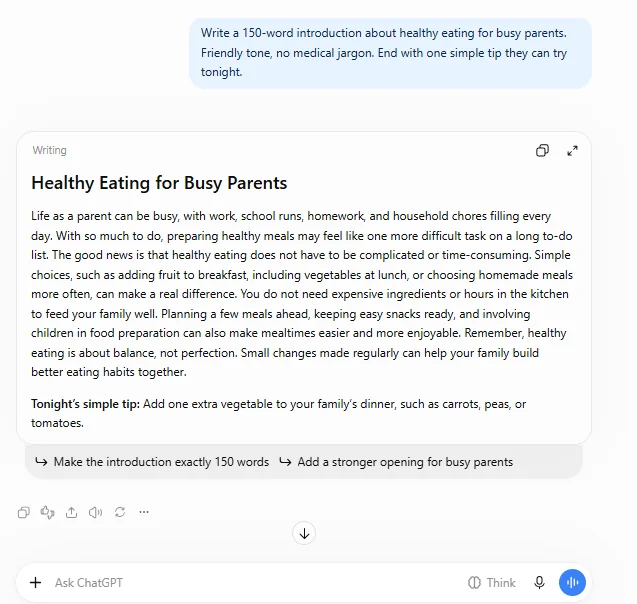
What changed: a reader, a length, a tone, and a concrete ending.
Pair 2: Explaining the solar system
Weak prompt:
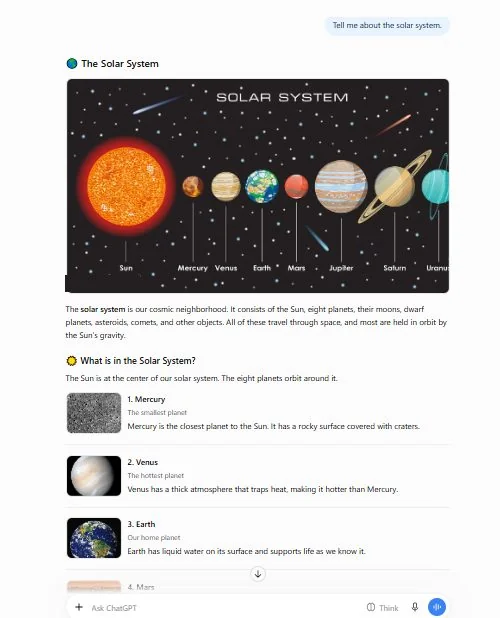
Tell me about the solar system.
What came back was a sprawling illustrated mega-article: all eight planets with pictures, five fun facts, even a quiz with a “Check my answers” button. Impressive — and completely overwhelming if you just wanted a quick explanation for a kid.
Fixed prompt:
Explain the solar system in 5 bullet points a 12-year-old can understand. Each point under 20 words.
What came back: five tight bullets, ready to read aloud. Done in seconds.
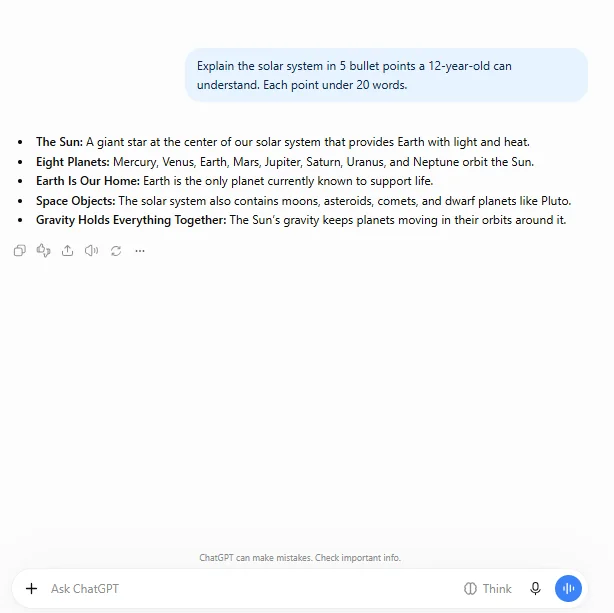
What changed: an audience plus a hard length limit turned an encyclopedia into an answer.
Pair 3: Birthday message
Weak prompt:
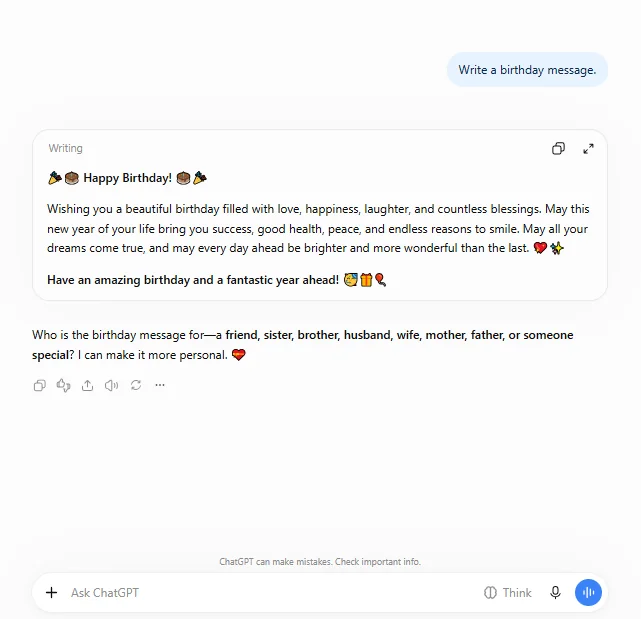
Write a birthday message.
What came back was generic card text stuffed with emojis — “Wishing you a beautiful birthday filled with love, happiness, laughter, and countless blessings…” Interestingly, even the model knew the prompt was missing everything: it replied asking “Who is the birthday message for?”
Fixed prompt:
Write a short birthday message for my 10-year-old nephew who loves dinosaurs. Funny and warm, under 50 words.
What came back: “Happy 10th Birthday, Dino Dude! Hope your day is ROAR-some…” Personal, funny, done.
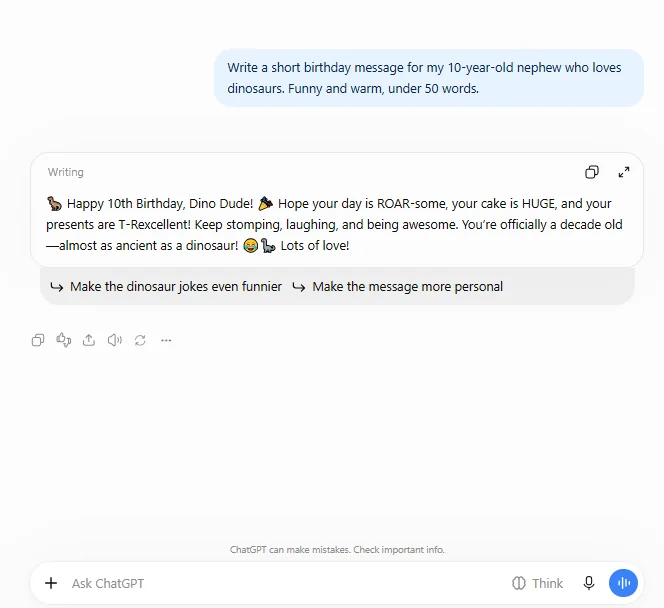
What changed: a recipient, an interest, a tone, a length. Four words of context — “nephew who loves dinosaurs” — did 90% of the work.
Three pairs, same lesson every time: the model didn’t change. The ask did.
Seven rules I wish someone had told me earlier
The method is the skeleton; these are the habits. Four of them are the 4 parts in disguise:
- Show, don’t just tell. If you know what “good” looks like, paste a short example. “Write product descriptions like this: [example]” beats three paragraphs of adjectives.
- One job per prompt. “Summarize this, then critique it, then rewrite it” gives you three mediocre results. Do one thing, then follow up in the same chat.
- Name the reader. “Explain inflation” and “Explain inflation to a 12-year-old” produce different planets. Always say who it’s for.
- Set a length. Models don’t know when to stop unless you tell them. “Under 150 words” or “about 5 bullets” — pick one, every time.
- Ask for the shape. Email, table, numbered steps, pros-and-cons — say the format out loud. Otherwise you’ll get an essay when you wanted a list.
- Treat the first answer as a draft. The pros don’t write one perfect prompt; they iterate. “Shorter.” “Less formal.” “Do that again but as a table.” Each follow-up is cheap and fast.
- Save what works. When a prompt gives you a great result, save it somewhere — a notes app, a document, anywhere. In a month you’ll have a personal toolkit, and you’ll stop starting from zero.
Two power techniques worth knowing
Once the 4-part method feels easy, these two take it further:
1. Make the model interview you first. End your prompt with: “Ask me any questions you need answered before you start.” This is gold when you’re not sure what context matters — planning a trip, choosing software, writing something sensitive. The model asks 3–4 sharp questions, you answer each in a line, and the real answer comes back dramatically better. You’re outsourcing the “what should I have told you?” problem to the model itself.
2. Give it a role. Start with “Act as an experienced hiring manager…” or “…as a patient math tutor…” A role hands the model a perspective: what it pays attention to, what language it uses, what “good” means from that chair. A cover letter reviewed “as a hiring manager” reads very differently from one reviewed “as a supportive friend.”
One honest caveat: a role changes the voice, not the expertise. “Act as a lawyer” doesn’t make it your lawyer — for anything with real consequences, a professional still beats a persona.
Three more techniques: examples, structure, steps
The 4-part method covers most days. When the answer has to come back in an exact shape, or the task has more than one step, reach for one of these.
1. Show it an example (few-shot prompting). Instead of only describing the style you want, paste one or two finished examples and let the model copy the pattern. This is the most reliable fix when the model keeps missing your format:
Turn these product notes into short benefit lines, like these examples.

Example input: "Steel bottle, keeps drinks cold 24 hours"
Example output: "Ice-cold water, all day long"

Now do the same for: "Canvas backpack, padded laptop sleeve, water-resistant"
Two examples usually beat ten. Keep them short, and make them genuinely good: the model copies your standard, not your intention.
2. Ask for a structure — headings, tables, or JSON — and fence your text off. If you plan to paste the answer somewhere, say exactly what shape it must take: named headings, a two-column table, a fixed set of fields. And when you paste material for the model to work on, fence it between ### markers, so the model treats it as material to work on, not as new instructions:
Read the meeting notes between the ### markers and return exactly this structure:
Decisions: (bullet list)
Owners and deadlines: (two-column table)
Unresolved: (bullet list, or "none")
###
[paste notes]
###
For anything another program will read, ask for JSON instead of prose: "Return the answer as JSON with exactly these fields: {"name": ..., "price": ..., "in_stock": true/false}." JSON is the most reliable shape when the answer feeds a spreadsheet, a form, or another tool — OpenAI's structured outputs guide documents how to ask for it.
3. Let it work step by step. For anything with stages (maths, planning, debugging, comparing two options), end your prompt with: “Work through it step by step, show your working, then give the final answer last.” The visible steps make errors easy to spot, and the model genuinely reaches better answers when it reasons on paper instead of jumping to a conclusion.
One caution that applies to all three: a tidier answer is not automatically a truer one. Structure helps you check the work. It does not do the checking for you.
What prompts can’t fix (the honest part)
I’d be lying if I said good prompting solves everything. It doesn’t. Here’s what no prompt can fix:
- Old or missing knowledge. If something happened last week and the model wasn’t updated, no wording trick will conjure the facts. Ask it to search the web instead — or check yourself.
- Made-up citations. Models sometimes invent sources that look real: plausible titles, real-sounding journals, broken links. If citations matter, open every single one.
- Context you never gave. The model can’t know your boss hates bullet points or your budget is $200 unless you say so. “It should have known” is never true.
- Judgment. A prompt can make the model write a convincing argument for either side of anything. Deciding what’s right is still your job. That’s not a limitation to work around — it’s the whole point of you being in the loop.
Rule of thumb: the more a mistake would cost you — money, reputation, someone’s health — the less you should trust any single AI answer, no matter how good the prompt was.
Five starter prompts to copy and use today
Steal these. Replace the bracketed parts and run them on any free AI plan:
1. The email polisher
Rewrite this email to sound [warm/professional/firm]. Keep it under [100] words. Don't change the facts, just the tone: [paste email]
2. The explainer
Explain [topic] to a [12-year-old / beginner / busy manager]. Use one everyday analogy. Under 200 words. End with one sentence on why it matters.
3. The planner
Make a [3-day / 1-week] plan for [goal]. I have [X hours per day] and [constraint, e.g. no gym access]. List each day's tasks as checkboxes. Flag the hardest day honestly.
4. The summarizer
Summarize this in 5 bullets, each under 20 words, for [audience]. Put the most important point first: [paste text]
5. The second opinion
Here's my [decision / paragraph / plan]: [paste]. Tell me the 3 strongest objections to it. Be direct — don't soften the criticism.
Frequently asked questions
Do longer prompts always work better?
No. Clearer beats longer. A 40-word prompt with a goal, a reader, and a length will outperform a 400-word ramble every time. Add detail that directs — cut detail that decorates.
Will this work on free AI plans?
Yes. The method is about how you ask, not which model answers. The three test pairs below were run on ChatGPT’s free plan; the same method applies on Claude and Gemini free tiers. If anything, it matters more on free plans, where you get fewer retries.
Should I be polite to the AI?
It doesn’t meaningfully change the answer. “Please” won’t hurt, but clarity helps far more than courtesy. Spend your words on specifics, not manners.
What if the answer is still bad after a good prompt?
Point at the specific failure: “Too long — halve it.” “This sounds corporate — make it sound like a person.” Vague dissatisfaction (“try again”) gets vague improvements. Specific corrections get specific fixes.
How long until this feels natural?
About a week of real use. You’ll catch yourself writing “write an email” and automatically adding “to whom, how long, what tone.” It becomes a habit, like checking your mirrors.
Where to go from here
Prompting is a multiplier: it makes every AI tool you use more useful. If you liked this guide, these go deeper:
- 25 AI Prompts for Teachers (2026) — the full copy-paste collection this method was built for
- ChatGPT vs Claude Free Plan (2026) — which free assistant rewards good prompting most
- A prompt framework that reduces guesswork — the 2-minute version of the 4-part method
And one last thing, from someone who writes prompts every day: the people who get the most out of AI aren’t the ones with the cleverest tricks. They’re the ones who know exactly what they want. The prompt is just where that clarity goes.
The same method works for pictures. See it applied in AI Image Tools for Beginners, with image prompts you can copy and adapt.
Writing for work instead? AI Prompts for Real Estate Agents collects prompts for listings, follow ups and client emails.